
Planning methods
Road Trip Planning Checklist: Build Days Worth Driving For
The map says the next town is three hours away. Then you add breakfast, a viewpoint, parking, a long lunch, and the walk you came for. By the time you reach the hotel, the “short driving day” has quietly become the whole day. A good road trip plan makes those stops visible from the start.
By the Huvver team · Reviewed October 23, 2026

The short answer
Choose your overnight bases, then build each day from driving, visits, breaks, and arrival tasks. Check current road access and reservations with the relevant authority, prepare the vehicle for the route, and download the information you need before leaving coverage. Keep a shorter version of each busy day.
Pick the overnight stops before filling the route
Start with the places where you want to spend time, then choose bases that let you enjoy them. A cheap hotel farther away may add another drive the next morning. A scenic stop between bases may save a return journey. Put the last stop, lodging, and next morning’s first activity on the map together before booking.
Consider the arrival arrangement as well as the distance. A campground, remote rental, and city hotel can have very different check-in and parking requirements. Write down whatever the host or operator confirms. That detail belongs in the travel day, especially if reaching the accommodation after dark would be awkward.
Add up the day, not just the driving
Use the map estimate as one ingredient. Add the activities, food stops, parking, fuel or charging, and time to settle into the next base. The example below uses made-up allowances to show the arithmetic. Replace every value with the times and tasks for your own route.
If the total feels tiring on paper, remove a visit or shorten the distance. Adding another overnight may be more useful than shaving minutes from a stop you actually want to enjoy. For longer journeys, NHTSA recommends allowing time for breaks, food, and rest or a driver change when needed.[1]
| Part of the day | Made-up allowance |
|---|---|
| Mapped driving | 3 hours |
| Visits and walks | 2 hours |
| Lunch and breaks | 1 hour |
| Parking, refueling, and arrival tasks | 1 hour |
| Total planned time | 7 hours, before any extra delay |
Check access before treating a stop as confirmed
Look for road closures, seasonal restrictions, parking rules, and attraction reservations on the official pages for the area. Check whether your vehicle fits the route and whether the rental agreement permits it. A route line alone cannot establish road access, clearance, or suitability for your particular vehicle.
National parks make the difference especially clear. The National Park Service advises checking each park’s alerts, facilities, and required permits or reservations as part of planning. Read the current page for the park you intend to visit. A rule from last season or a neighboring park can send you toward the wrong entrance or an unavailable activity.[2]
Prepare the vehicle and the information
Before a long journey, follow the vehicle manufacturer’s guidance and check items appropriate to the season and route. NHTSA’s road-trip guidance includes tires, lights, fluids, and a roadside kit. If you are renting, understand the vehicle, roadside-assistance arrangements, and fuel or charging requirements before you leave the pickup location.[1]
Save the next overnight address, access instructions, and the places where you expect to stop. Download the relevant map area and test it without a connection. Google Maps says offline driving guidance requires the route to fit within the downloaded area, and live traffic or alternate routes are unavailable offline. Check that coverage includes detours you may reasonably need.[3]
Keep a shorter day ready
Choose which stop you would skip if departure runs late or conditions change. Make the remaining route straightforward enough that you can decide while parked, without rebuilding the holiday in the passenger seat. An optional viewpoint is easier to drop than a remote lodging reservation.
Put the condition-sensitive part early enough that you can reassess it. Check the road authority and weather before setting off, then update the plan when appropriate. A saved itinerary helps you see the choices; current conditions decide whether those choices still make sense.
A final road-trip review
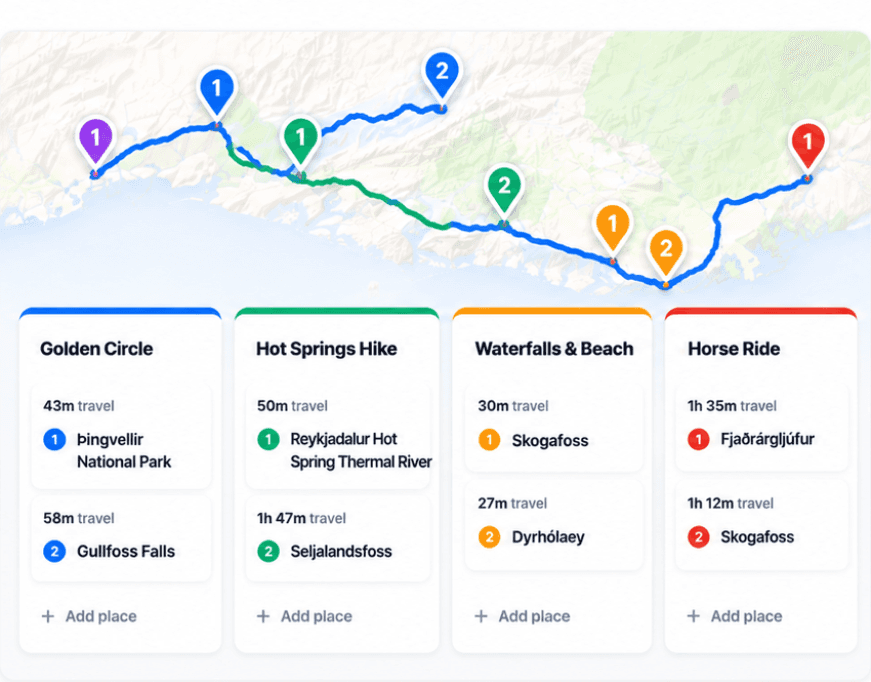
Huvver can keep the ordered stops, drive legs, overnight stays, and alternatives on a day board beside a map. It can also prepare saved trip coverage in the iPhone app. Its saved routes do not provide live road closures, turn-by-turn directions, or RV clearance routing, so keep the appropriate navigation and road information available.[4][5]
Before departure, check the first day and the longest day with your companions. Can everyone find the next base? Is the main visit still enjoyable after the drive? Which stop can move? Those answers will tell you more about the plan than the total number of miles.
- Confirm each overnight base, check-in arrangement, and parking or access instructions.
- Add driving, visits, breaks, and arrival tasks to the day’s planned time.
- Check current roads, vehicle suitability, reservations, and the weather.
- Prepare the vehicle, download the necessary coverage, and identify a shorter day.
Explore a real trip
See day-by-day routes with maps, notes, and editable Huvver templates.
Sources and review notes
Outside product details are linked to first-party pages. Advice and recommendations are Huvver’s editorial judgment; this article does not imply hands-on testing unless it says so.