
Planning methods
Travel Itinerary Template: What to Include for Every Day
A beautiful itinerary can still leave you standing outside a station asking which hotel you are going to. The best template answers the practical questions quickly, then gives you enough room to enjoy the day.
By the Huvver team · Reviewed October 23, 2026
The short answer
Include the date, overnight base, ordered stops, travel between them, confirmed reservation times, and links to the information you need. Keep optional ideas separate from commitments. Use the same structure for each day, with lighter arrival, transfer, and departure days.
Start with a one-page trip overview
Write the trip dates, travelers, arrival and departure points, and the sequence of overnight bases. Add the local time zone wherever a connection crosses one. This overview should let a companion understand the route without opening every day. Save the detailed booking documents separately and link to them where appropriate.
Use a clear status for purchases: idea, awaiting confirmation, or booked. “Hotel near the station” is a useful research note; the confirmed property name, entrance address, and check-in arrangement are useful travel information. Keep that distinction as the plan gets more detailed.
Use these fields for each day
Think in the order a traveler needs the information. Where do we begin? What is fixed? How do we get there? Where do we finish? A short note about the correct entrance or bag storage can be more useful than another paragraph describing a famous attraction.
Add exact times where they matter. A timed admission, train departure, or host meeting time belongs in the plan. A neighborhood stroll can remain a morning or afternoon block. That gives important reservations a clear place without making every coffee stop look like a deadline.
| Field | What to record |
|---|---|
| Date and base | Local date, where you wake up, and where you sleep. |
| Main plan | The day’s main activity and any confirmed entry time. |
| Travel legs | Start and end point, mode, planned duration, and operator link. |
| Practical notes | Entrance, luggage, meeting point, or other information needed on arrival. |
| Alternatives | Nearby optional stops and a simpler version of the day. |
A three-day example you can adapt
The example below is an illustrative city break with placeholder activities. Replace the blocks with the opening hours, transport, and accommodation arrangements for your destination. Notice that the arrival afternoon and departure morning carry fewer commitments than the full day.
If you have an early arrival, you might gain more time. If the airport transfer is long or the group needs a slower start, you might gain very little. Update the example around those facts before adding tickets. The template is doing its job when it reveals the space you actually have.
| Day | Plan | Overnight or departure |
|---|---|---|
| Arrival day | Reach lodging or store bags; lunch; a nearby neighborhood walk; flexible dinner. | Same city base |
| Full day | One booked morning visit; lunch nearby; an optional afternoon area; time to return. | Same city base |
| Departure day | Breakfast; checkout; a short local stop only if time allows; transfer to departure point. | Confirm the carrier’s required arrival time |
Give transfers the space they need
Separate the transport departure from the time you need to leave your accommodation. Include reaching the station or airport, required pre-departure steps, the journey, and reaching the next base. Eurostar, for example, gives different guidance by route and class and tells London-route passengers to use the arrival time on their ticket. One universal station buffer would be misleading.[1]
Save exact station names and the operator’s link. A city can have several stations, and “the central station” may not be the one on your ticket. When you add a connection, revisit the rest of that day: the train can fit while the lunch booking afterward becomes uncomfortable.
Choose a format your companions will open
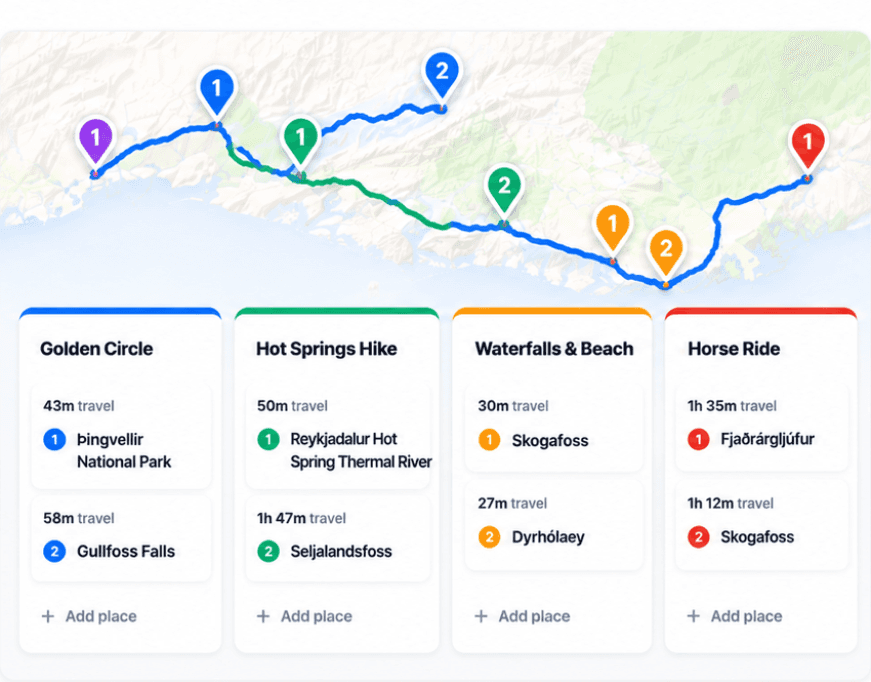
A document or spreadsheet works well when you want custom fields and a simple printable page. A day board with a map is helpful when the order of stops changes often. The important thing is to choose one current itinerary, share its link, and update it when the group changes a decision.
In Huvver, days, places, travel legs, Ideas, and overnight stays form that shared plan. Public destination guides let you preview complete examples. Making an editable copy requires an owner subscription; invited collaborators can join the owner’s trip free. Use notes and official links for booking context, while keeping tickets available in the supplier’s supported format.[2][3][4]
Check the template from a traveler’s point of view
Ask a companion to find tomorrow’s first stop, the overnight address, and the departure time without your help. If they cannot, shorten the labels or move the useful detail closer to the stop. A trip plan should become easier to use as it grows.
For an outdoor excursion, add the activity-specific details recommended by the relevant authority. The National Park Service’s Trip Plan, for instance, is intended to help a trusted contact understand the activity and expected return. A general holiday template may need that separate plan alongside it.[5]
Explore a real trip
See day-by-day routes with maps, notes, and editable Huvver templates.
Sources and review notes
Outside product details are linked to first-party pages. Advice and recommendations are Huvver’s editorial judgment; this article does not imply hands-on testing unless it says so.