
Trip planner comparison
Huvver vs Google Maps: Is a Saved List Enough for Your Trip?
Google Maps is exceptionally useful for finding places, saving them to collaborative lists, and getting directions. Huvver answers a different question: which stop belongs on which day, how the sequence fits around travel and overnight stays, and what the group spent. Many travelers will want both tools.
By the Huvver team · Reviewed October 20, 2026
Huvver publishes this comparison and sells one of the products discussed. Our assessment uses the linked product documentation; it is not a hands-on benchmark.
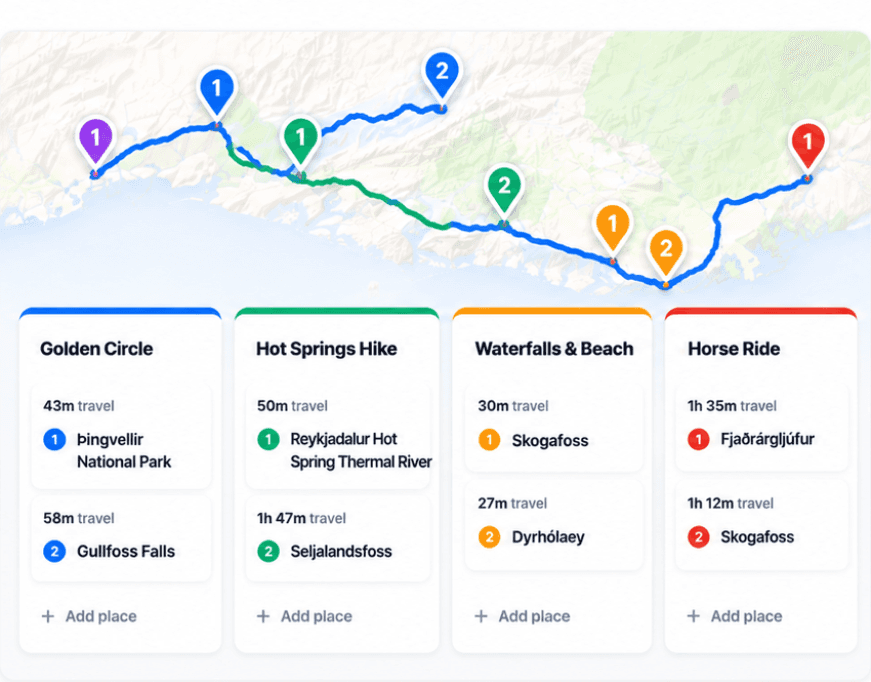

The quick verdict
Choose Huvver when…
Choose Huvver when a list of pins has become a multi-day schedule with route decisions, overnight bases, and shared expenses.
Choose Google Maps when…
Choose Google Maps when place discovery, current business information, everyday navigation, or a simple shared shortlist is the main job.
Huvver vs Google Maps at a glance
| Question | Huvver | Google Maps |
|---|---|---|
| Organizing places[5][1] | Ordered places on days, plus unscheduled Ideas and overnight stays. | Saved lists with notes and map pins; collaborators can add or edit places. |
| Getting around[5][2] | Travel legs and modes stay attached to the itinerary; open directions when it is time to go. | Turn-by-turn navigation, traffic, transit, walking, and local place information. |
| Sharing[10][1] | Invite editors or viewers to the trip and share a separate read-only itinerary. | Share lists and invite other people to collaborate on saved places. |
| Costs[6][1] | Record shared or private expenses, split them, and see settlement suggestions. | A saved-place list does not serve as a group expense ledger. |
| Offline[7][4] | Prepare the trip and saved map coverage in the iPhone app. | Download map areas; offline directions have mode and live-data limitations. |
| Pricing model[3][8] | Annual subscription for the trip owner; invited editors and viewers join free. Public previews are free. | Free consumer maps, saved lists, and navigation. |
| Devices[9][4] | Web editing and iPhone (iOS 26.5+); no native Android app. Offline preparation is iPhone-only. | Web, iPhone, and Android; offline map downloads are in the mobile apps. |
A shortlist is a good first step
Google Maps is often the fastest way to collect a restaurant, museum, station, and hotel while researching. Its lists can be shared, and invited collaborators can add and edit saved places. That is enough for a short, flexible visit. Google also has the richer navigation job: current place information, directions, and traffic belong to its core product.[1][2]
The decision changes when twenty saved places must become four realistic days. A pin does not, by itself, say which morning it belongs to, what comes before it, where the group sleeps, or who paid for the booking. Huvver gives those decisions an ordered day board beside a route map. Unscheduled Ideas remain visible until the group is ready to place them.[5]
Turn saved places into a day plan
Imagine leaving a hotel in Kyoto, taking a train to Osaka, visiting two places, and checking into a new base. In Google Maps you can save the locations and ask for each journey when needed. In Huvver you can put the stops and travel legs into one day and see the overnight handoff in the context of the whole trip. The latter is useful when changing one stop affects what is practical later.[1][5]
This does not make Huvver a substitute for Google Maps navigation. For a live detour, opening hours, traffic, or turn-by-turn guidance, Google Maps remains a strong companion. Huvver is where the group can keep the agreed plan and cost record.[2][5][6]

Offline maps solve different problems
Google lets travelers download an area before leaving service, but its help page says offline walking, cycling, and transit directions are unavailable, and offline driving loses live traffic and alternate routes. Huvver’s iPhone preparation saves its itinerary and map coverage for the planned trip. Check both downloads before departure, especially for a remote route; neither should be treated as a promise of current road conditions without a connection.[4][7]
Which should you use?
Use a collaborative Google Maps list when the group mainly needs options and directions. Move to Huvver when the options need to become an ordered, shared itinerary with overnight bases and actual expenses. Keeping Google Maps for navigation alongside Huvver’s day plan keeps the agreed itinerary and live directions close at hand.[1][5][6]
Common questions
Can people collaborate on a Google Maps list?
Yes. Google Maps supports sharing lists and inviting collaborators to edit saved places.
Does Huvver replace Google Maps navigation?
No. Huvver plans the sequence and travel legs; Google Maps remains useful for live directions and place information.
Can Google Maps track group trip costs?
Its saved lists are for places. Huvver includes shared and private expenses, splits, and settle-up suggestions.
How we researched this comparison
Huvver publishes this article and has an interest in your choice. We checked the competing product’s public feature and support pages against Huvver’s current product pages on the review date above. This is a source-based comparison, not a claim that we ran a controlled hands-on test. The credited product images are publisher-supplied, rather than screenshots from our own test. Features and prices may change.
- [1]Google Maps: create, share, and edit lists
- [2]Google Maps: directions and places
- [3]Huvver product and plans
- [4]Google Maps: download areas and navigate offline
- [5]Huvver help: planning
- [6]Huvver help: costs
- [7]Huvver help: offline
- [8]Google Maps plans and availability
- [9]Huvver help: devices
- [10]Huvver help: sharing