
Trip planner comparison
Huvver vs TripIt: Plan the Trip or Organize the Bookings?
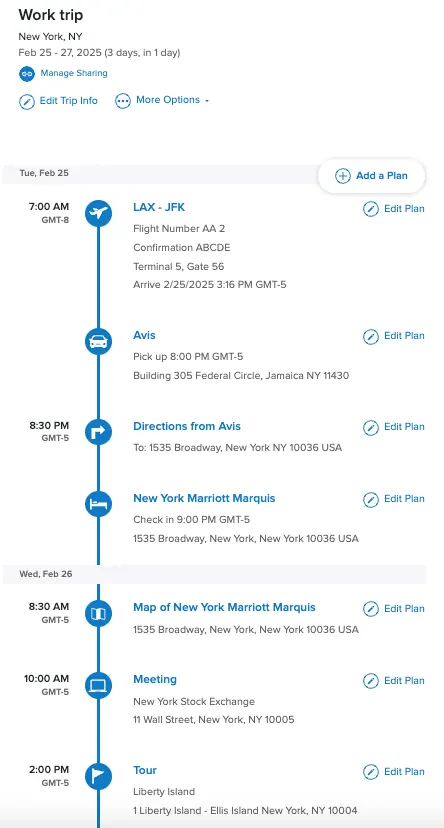
TripIt turns booking confirmations into one itinerary and adds flight monitoring with Pro. Huvver helps arrange places across days, inspect travel legs on a map, plan with companions, and settle shared costs. TripIt also has manual entry, a mobile map, sharing, and offline trip details. Choose based on whether booking organization or building the daily route is your main task.
By the Huvver team · Reviewed October 20, 2026
Huvver publishes this comparison and sells one of the products discussed. Our assessment uses the linked product documentation; it is not a hands-on benchmark.
The quick verdict
Choose Huvver when…
Choose Huvver if you need to build and keep adjusting a multi-day plan of places, routes, overnight stays, and group costs.
Choose TripIt when…
Choose TripIt if your biggest problem is collecting reservation confirmations or staying ahead of flight changes, especially on Android.
Huvver vs TripIt at a glance
| Question | Huvver | TripIt |
|---|---|---|
| Best starting input[11][1][2] | Places and days, or a complete editable destination template. | Forward confirmation emails or connect an inbox to assemble booked plans. |
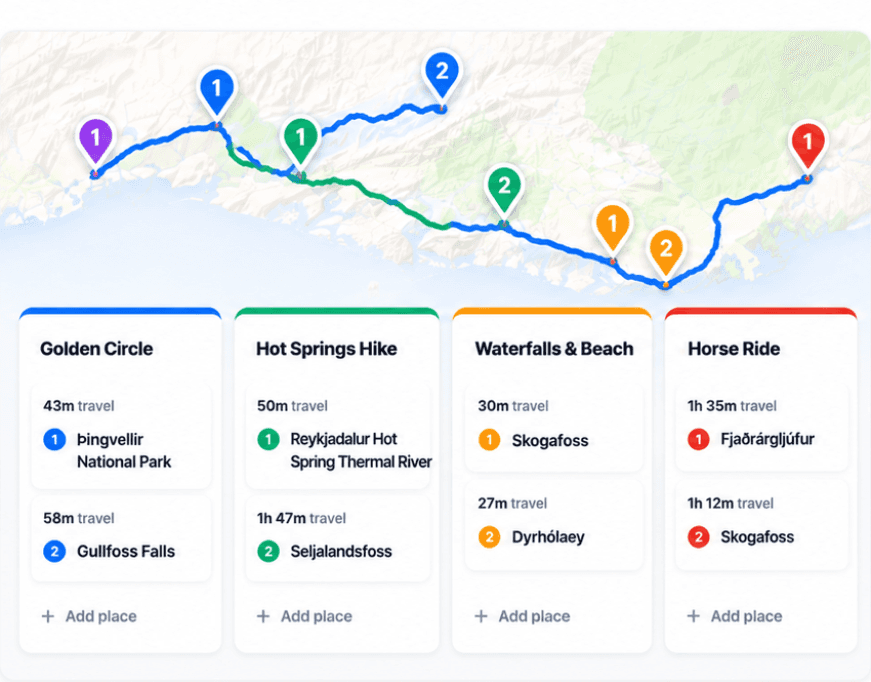
| Map and movement[11][4][5] | Live board map with day-by-day stops and travel legs. | Mobile map pins for plans with addresses; Navigator opens a mapping app for directions. |
| Working with others[15][6][12] | Invite editors and viewers to build the trip; track shared costs and settle balances. | Private invitations offer view and edit permissions; share plans and itineraries. |
| Travel day alerts[11][7][13] | Prepared itinerary and saved map; no live airline disruption service. | TripIt Pro adds flight, gate, alternate-flight, and risk alerts. |
| Offline[13][9] | Prepared offline itinerary and saved map on iPhone; web for online planning. | Offline trip details in signed-in iOS and Android apps; updates wait for connectivity. |
| Pricing model[8][7] | Annual subscription for the trip owner; invited editors and viewers join free. Public previews are free. | Free itinerary organization; paid Pro adds flight alerts and disruption tools. |
| Devices[14][9] | Web editing and iPhone (iOS 26.5+); no native Android app. Offline preparation is iPhone-only. | Web, iPhone, and Android; offline trip details are in the signed-in mobile apps. |
TripIt begins with what you have booked
TripIt’s defining shortcut is forwarding a flight, hotel, car, or other confirmation email to its plans address. It builds a consolidated itinerary and can also add plans through Inbox Sync or manual entry. This is particularly useful when you travel often and the information already exists across many vendor emails. Huvver does not currently offer automatic confirmation-email import, so TripIt has the clearer path for that job.[1][2][10]
Huvver begins with the route you are designing. The day board and map keep places in order, show travel legs, and give overnight stays a place in the itinerary. A traveler can copy a public Huvver guide and change its dates, stops, and notes. This is useful before tickets are bought, or when the trip includes many unbooked walks, meals, and activities that still need an order.[3][11]
TripIt has a map and meaningful sharing
Its iOS and Android apps have a map view with a pin for each plan that has a valid address. Navigator finds transportation options and can open a mapping app for directions. TripIt also offers private invitations with view and edit permissions. Huvver’s distinction is that the board and routed map are the main place where you compose and revise each day.[4][5][6][11]
If flights and hotels already anchor the trip, TripIt’s confirmation timeline can remain the main record. Huvver becomes useful when the group still needs to place unbooked walks, meals, and activities around those reservations. When using both, keep reservation changes in TripIt and update the affected day in Huvver so companions know where to find the agreed plan.

Flight intelligence versus group trip operations
TripIt Pro adds real-time flight alerts, alternate flights, gate reminders, and other airport help. Huvver does not replace that disruption service. Huvver instead includes a shared cost ledger with traveler or paying-group splits, private costs, recorded payments, and settle-up suggestions. That becomes important on a trip where several people pay for lodging, transport, and meals at different times.[7][12][11]
TripIt’s basic service is free and Pro is a separate paid tier. Huvver uses an annual owner subscription with free invited collaborators. Compare the price against the job you need covered: frequent flyers may value Pro alerts, while a group planning several routes may get more value from an editable board and shared ledger.[7][8]
Offline access is available in both
TripIt’s signed-in iOS and Android apps can show existing travel details offline; new information waits for connectivity. Huvver’s iPhone app can prepare itinerary data, saved map coverage, and route data. Huvver has no native Android app. These planner features do not replace offline turn-by-turn navigation: download a suitable navigation map separately and check the saved trip before departure.[9][13][14]
Common questions
Can TripIt show a trip on a map?
Yes. The TripIt mobile app has a map view for plans with valid addresses, and Navigator can help find directions between itinerary items.
Does Huvver import booking confirmation emails?
No automatic confirmation-email import is currently offered. TripIt is the stronger choice for turning many booking emails into an itinerary.
Can TripIt and Huvver be used together?
Yes. You can keep booking details and flight alerts in TripIt while using Huvver to arrange daily places, routes, and shared costs.
How we researched this comparison
Huvver publishes this article and has an interest in your choice. We checked the competing product’s public feature and support pages against Huvver’s current product pages on the review date above. This is a source-based comparison, not a claim that we ran a controlled hands-on test. The credited product images are publisher-supplied, rather than screenshots from our own test. Features and prices may change.
- [1]TripIt: how it works
- [2]TripIt: getting started and Inbox Sync
- [3]Huvver trip guides and editable templates
- [4]TripIt mobile map view
- [5]TripIt Navigator
- [6]TripIt trip sharing
- [7]TripIt and TripIt Pro features
- [8]Huvver plans and included features
- [9]TripIt offline mobile access
- [10]Huvver help: place import
- [11]Huvver help: planning
- [12]Huvver help: costs
- [13]Huvver help: offline
- [14]Huvver help: devices
- [15]Huvver help: sharing