
Trip planner comparison
Huvver vs Tripadvisor Trips: From Great Ideas to a Workable Route
Tripadvisor connects traveler reviews, hotel and activity discovery, and free AI planning to booking. Its suggested day itineraries can be edited and shared. Huvver combines a day board, travel legs, overnight stays, and group expense settlement. Tripadvisor is a useful starting point for choosing experiences; Huvver adds a workspace for the agreed route and actual spending.
By the Huvver team · Reviewed October 20, 2026
Huvver publishes this comparison and sells one of the products discussed. Our assessment uses the linked product documentation; it is not a hands-on benchmark.

The quick verdict
Choose Huvver when…
Choose Huvver when the group needs to work through ordered stops, travel legs, stays, and actual shared spending.
Choose Tripadvisor Trips when…
Choose Tripadvisor when reviews, attraction discovery, live availability, and booking options drive the decision.
Huvver vs Tripadvisor Trips at a glance
| Question | Huvver | Tripadvisor Trips |
|---|---|---|
| Finding ideas[5][2] | Curated destination guides and editable route templates. | Large review and booking ecosystem with attraction, hotel, and activity discovery. |
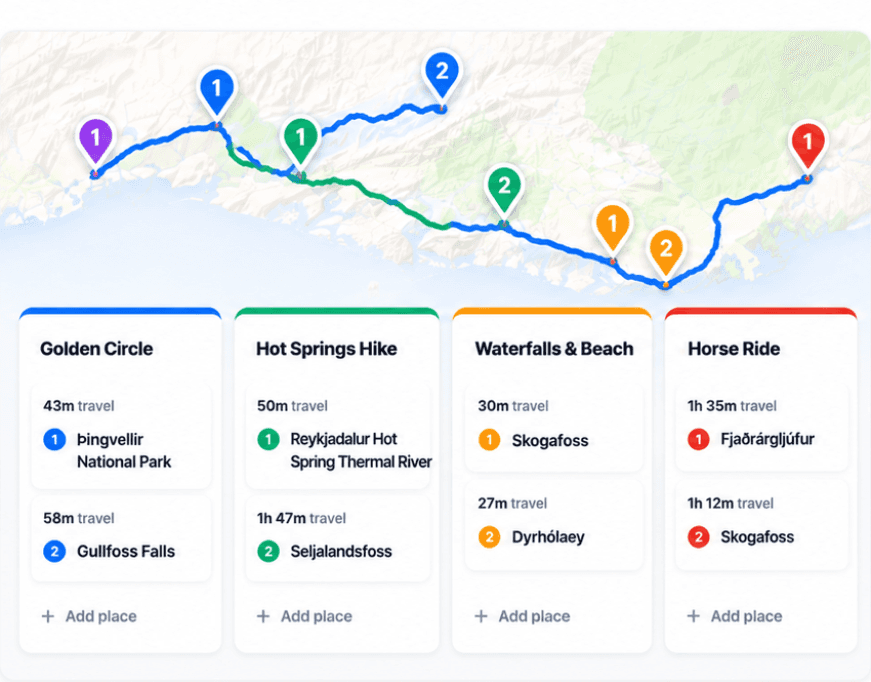
| Daily plan[5][2] | Day board and live map with ordered stops, legs, and overnight stays. | AI-generated day-by-day itinerary that travelers can rearrange and view on a map. |
| Planning together[10][1] | Editor and viewer invitations plus a public read-only trip view. | Trips supports saving, sharing, and collaborative planning. |
| Trip money[6][2] | Actual shared and private expenses, splits, and settlement suggestions. | Booking and availability context; evaluate group accounting separately. |
| Pricing model[4][2] | Annual subscription for the trip owner; invited editors and viewers join free. Public previews are free. | Free Trips and AI planning; sign in to save trips. Bookings are paid separately. |
| Devices[7][1][8][9] | Web editing and iPhone (iOS 26.5+); no native Android app. Offline preparation is iPhone-only. | Web, iPhone, iPad, and Android, with saved trips and itinerary planning. |
Tripadvisor is more than a list of reviews
Tripadvisor Trips brings saved ideas and companions into the same planning area. Its AI Assistant can generate a day-by-day itinerary, show stops on a map, and let a traveler rearrange days and places. It also connects suggestions to hotel and activity availability.[1][2]
That strength is especially valuable before a group knows what to include. Reviews and booking context can help answer whether a sight, hotel, or tour is worth the time. Huvver’s guides are more prescriptive: each provides a complete route that can be copied and edited, rather than Tripadvisor’s much larger discovery catalog.[2][3]
Keep route decisions and shared spending together
Once the group has picked its activities, decide which base and day each belongs to. Huvver’s board keeps the ordered places, travel legs, and overnight stay together. You can move an undecided stop to Ideas instead of leaving it in a day that no longer fits. Tripadvisor’s saved AI itinerary also allows changes to days and stops, so either product can remain the plan if its layout meets your needs.[2][5]
Huvver also holds the group’s actual expenses. Travelers can assign a payer, split a shared purchase among people or paying groups, keep a private cost private, and record a settlement. That helps when the itinerary becomes a real trip with deposits, meals, and transport paid by different people.[6]

A sensible two-tool workflow
Use Tripadvisor to assess the options and check bookable experiences. If your chosen places become a complicated multi-base route, use Huvver to make the shared day plan and cost record. Conversely, for a short trip where review-led discovery and booking are the main tasks, Tripadvisor Trips may cover everything you need.[1][2][5][6]
Common questions
Can Tripadvisor make an editable day-by-day itinerary?
Yes. Its AI Assistant offers day-by-day plans that can be rearranged and viewed on a map.
Is Huvver a review or booking marketplace?
No. Huvver has curated guides and editable trip templates; Tripadvisor is stronger for broad reviews and booking discovery.
When does Huvver add value?
When travelers need a detailed route board, overnight stays, and an actual shared expense ledger alongside the selected activities.
How we researched this comparison
Huvver publishes this article and has an interest in your choice. We checked the competing product’s public feature and support pages against Huvver’s current product pages on the review date above. This is a source-based comparison, not a claim that we ran a controlled hands-on test. The credited product images are publisher-supplied, rather than screenshots from our own test. Features and prices may change.